
Рекламные и SMM сервисы для продвижения вашего бизнеса


- Главная ›
- Главная / EN ›
- Способы API интеграции с SurfEarner / EN

Ways to integrate the SurfEarner API for resellers
SurfEarner - A service provider with a live audience of performers
SurfEarner is a Service provider with a live audience of performers.
There are several integration methods for reselling our services:
1
1
Integration with our SMM dashboard expert24.ru based on the Perfect Panel platform
Most of the services from the entire range are available.Anchor
1
2
Provider integration surfearner.com based on the Perfect Panel platform
Only the "Live Views on YouTube" service is available. Anchor
1
3
Integration surfearner.com directly via the API
So far, only the "Live Views on YouTube" service is available.Anchor
1. Provider integration expert24.ru based on the Perfect Panel platform
Expert24.ru - This is an SMM panel based on the Perfect Panel platform from SurfEarner.
You can connect the provider Expert24.ru and create services based on a list of almost all services available on our SMM dashboard.
If your panel is based on the Perfect Panel platform, then use the provider's internal connection solution using the API key.
If you have a dashboard on another platform or a self-written site, then use the API documentation of our dashboard.
The list contains services that are not available for ordering via the dashboard due to their specific features. The name of such services contains the abbreviation / SE /, for example: YouTube Live Views via direct link / Customizable / SE / from 60 rubles for 1000
This means that such services can only be ordered on the site SurfEarner.com or through a manager.
SurfEarner has its own live audience of performers, so we are a direct service provider with live activity. Accordingly, for these services, we have the lowest price and there are services that other suppliers do not have on the market.
Services with a live audience either say that they are "Live" or indicate / L/, which means Live.
How to connect if your dashboard is based on the Perfect Panel platform:
Go to the admin panel of your panel, go to the Settings tab, select Providers, and click Add provider
Enter in the field expert24.ru then click Add provider
Register an account in the dashboard Expert24.ru and log in
Log in to the account section: https://expert24.ru/account
At the very bottom of the page, generate a new API key
Go back to the admin panel, enter the API key, and click Save changes
Provider expert24.ru it will appear in the list and your account balance will be displayed in our dashboard
Then go to your admin panel in the Services tab and click Add service or add a subscription to the Add subscription service
Next, select a provider expert24.ru, select the desired service and configure it
How to connect if you have a different dashboard or your own website:
To enable it, use the API documentation: https://expert24.ru/api
If you connect directly via the API, you don't need instructions.You already understand everything. But if you have any questions, we are always in touch 😉
2. Provider integration surfearner.com based on the Perfect Panel platform
SurfEarner.com - this is our main website with all the available range of services.
At the moment, our flagship product is integrated into Perfect Panel: the “Live Views on YouTube " service - an exclusive technology for performing video views by real viewers directly on the YouTube site without frames and bots with execution control via the official SurfEarner browser extension.
If you have a panel on the Perfect Panel platform, you can connect the provider surfearner.com and create services based on YouTube views with different settings.
Unique and flexible settings, such as:
- hold duration from 20 seconds to 20 minutes with an interval of 5 seconds,
- different scenarios for switching to video viewing to create the traffic sources you need for YouTube analytics,
- execution settings: speed, restrictions on views and repetitions on uniqa,
- audience targeting by country, gender and age.
You can create the required number of services in different variations of settings.
How to connect:
Go to the admin panel of your panel, go to the Settings tab, select Providers, and click Add provider
Enter in the field surfearner.com then click Add provider
Go to the "API for Developers" section in SurfEarner: https://surfearner.com/apidoc
Generate a new API key
Go back to the admin panel of your dashboard, enter the API key, and click Save changes
Provider surfearner.com it will appear in the list and your SurfEarner account balance will be displayed
Next, open the Services tab in the admin panel and click Add service (You can also add a subscription to the Add subscription service)
Enter your details and click Save changes
How to create services:
You can create as many services in different variations as you need.
To create a service, go to the Services tab in your dashboard admin panel and click Add service (similarly, Add subscription is added).
Enter the necessary settings. All settings options are described below.
For example, let's create a service with the following settings:
- with a hold of 60 seconds,
- with a direct link to the video,
- with an interval of views for one person every 12 hours,
- without restrictions on the speed of distributing tasks to users,
- without confirming the completion of viewing by entering a captcha,
- only for performers from Kazakhstan, Belarus and Germany
- without restrictions on the number of views per artist
Enter these values:
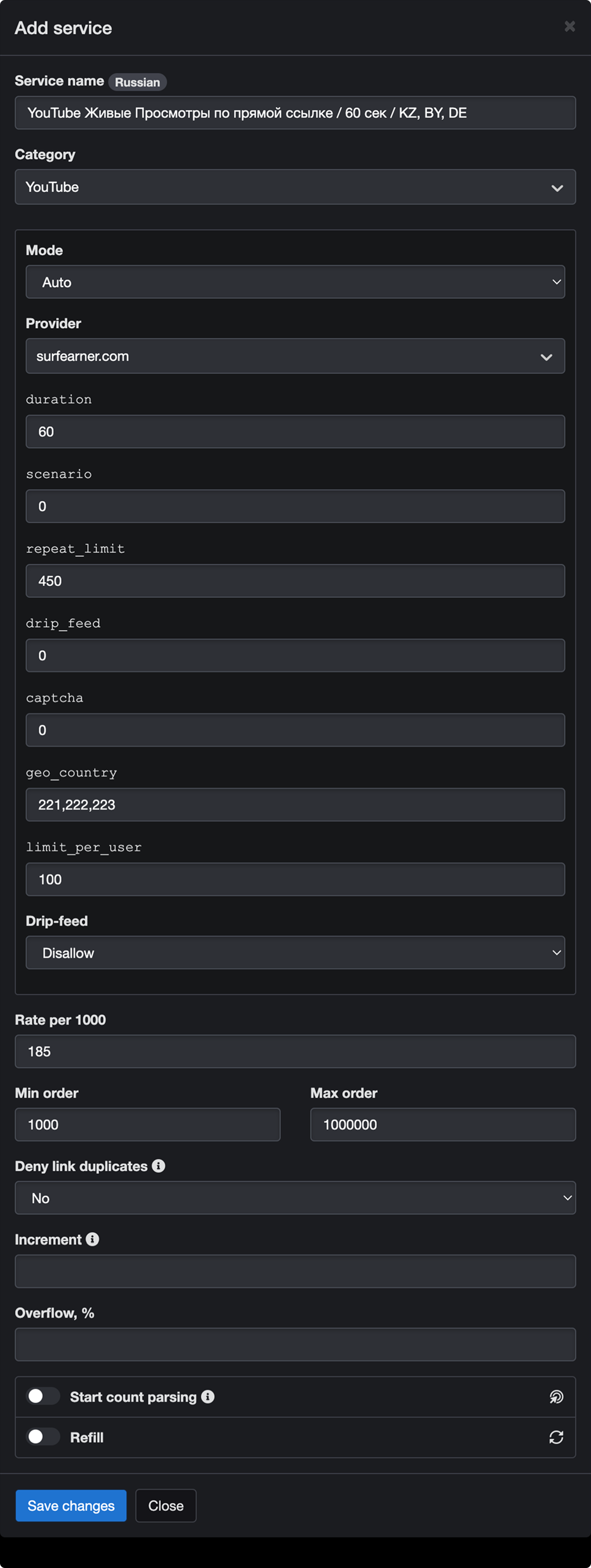
Decoding:
- duration = 60
hold for 60 seconds - scenario = 0
the user goes to view the video using a direct link to the video - repeat_limit = 450
repeat interval between runs for one performer: every 12 hours - drip_feed = 0
average impressions per minute: unlimited - captcha = 0
user input of captcha: not required - geo_country = 221,222,223
viewing geography, countries are added separated by commas - limit_per_user = 100
limit on the number of runs per executor: no limits
Next, you need to specify the price for 1000 pageviews.
To do this, open the "Live YouTube Views" service order form in your SurfEarner merchant profile, set similar settings, and as a result, you will see the final price for 1000 views in the payment block.
The price consists of the total CPM for 1000 pageviews + the specified settings.
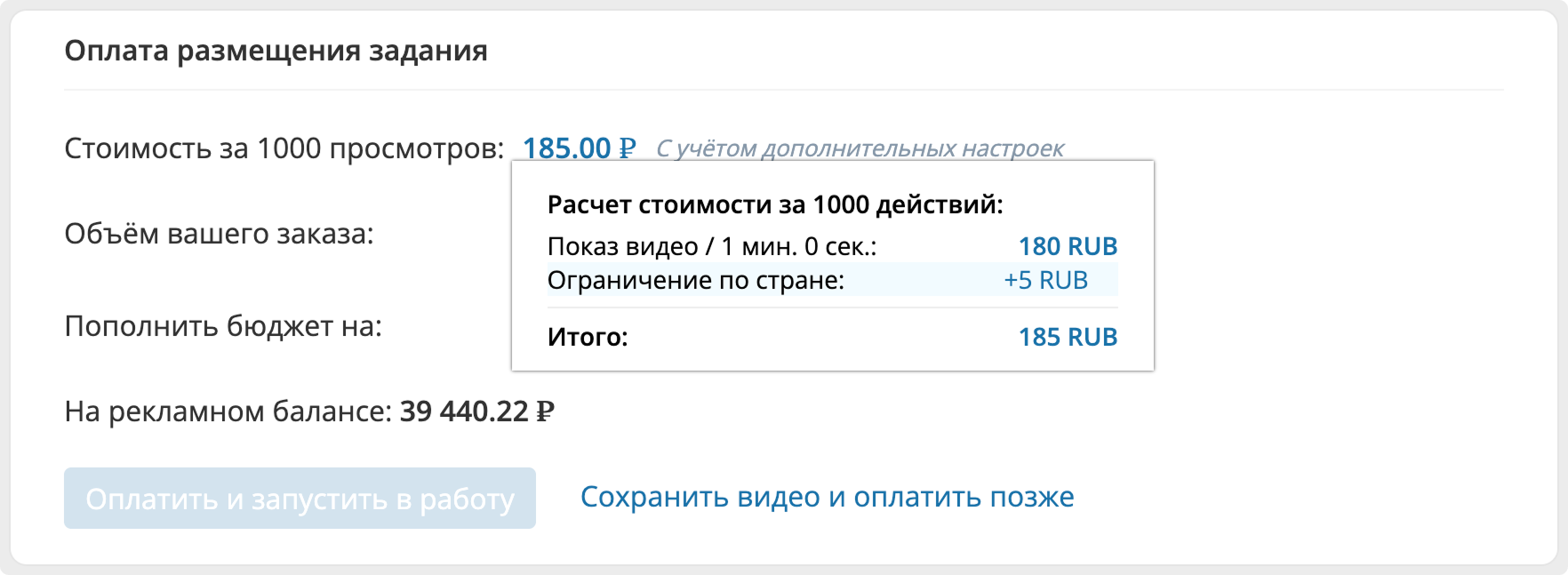
Enter the price in the Rate per user field in your admin panel: 185 ₽
Next, specify the minimum and maximum views for a single order:
Minimum - Maximum = 1000-1000000 (arbitrary, but not less than 100 views)
* The duration field is required, all other fields can be left blank, and the default values will be substituted: the "direct link to video" transition scenario, execution settings, and audience targeting without restrictions, with repeated views per user every 12 hours.
Table of parameter values:
The "Field content" column contains data from the example described above.
| Параметр | Содержимое поля | Описание параметра (Values:) |
| duration | 60 | Duration of viewing, in seconds. (hold). Default value: not set, *required field In seconds: min-max: 20-1200 (20 sec - 20 min) |
| scenario | 0 | Scenario for the user's transition to viewing a video. Default value: 0 Explanation of values: 0-Via a direct link to the video 1 - Via channel pages 2 - Via" Search "on YouTube by video title 3-Via" Search " on YouTube by keywords 4-Via a post in a social network |
| captcha | 0 | Require the performer to enter a captcha. Default value: 0 Explanation of values: 0 - No 1-Yes |
| limit_per_user | 100 | Limit the number of runs per performer. Default value: 100 Decoding values: 100-no restrictions 200-no more than 1 time 250-no more than 2 times 300-no more than 3 times 400-no more than 5 times 500-no more than 10 times 600-no more than 20 times 700-no more than 30 times |
| repeat_limit | 450 | Repeat interval between runs for a single performer. Default value: 450 Decoding values: 125-every 15 minutes 150-every 30 minutes 200-every 1 hour 300-every 3 hours 400-every 6 hours 450 - every 12 hours 500-every day 600-every 2 days 700-every 3 days 800-every 4 days 900-every 5 days This parameter becomes inactive if the max_views parameter = 200, that is, if the number of completed views per user = 1, then it is logical that there will be no repetitions. |
| drip_feed | 0 | The average number of impressions per minute (a batch distribution, for example, 60 runs per minute). Default value: 0 Explanation of values: 0-unlimited 1-60 impressions per minute 2-30 impressions per minute 4 - 15 impressions per minute 6 - 10 impressions per minute 12-5 impressions per minute |
| geo_country | 221,222,223 | Restricted by country. Default value: 0 - All countries The values are explained in a separate table: geo_country @Google Docs |
3. Integration surfearner.com directly via the API + documentation
SurfEarner.com - this is our main website with all the available range of services.
Currently, only one of our flagship products is available for direct integration: the “Live Views on YouTube " service - an exclusive technology for performing video views by real viewers directly on the YouTube site without frames and bots with execution control via the official SurfEarner browser extension.
If you want to remotely manage orders on the site SurfEarner.com If you don't need to use your merchant profile or manage orders on your site by creating services with different settings, you can connect directly to the site using an API key. To implement it, you will need an account in SurfEarner.com.
Unique and flexible settings, such as:
- hold duration from 20 seconds to 20 minutes with an interval of 5 seconds,
- different scenarios for switching to video viewing to create the traffic sources you need for YouTube analytics,
- execution settings: speed, restrictions on views and repetitions on uniqa,
- audience targeting by country, gender and age.
You can create the required number of services in different variations of settings.
How to connect:
Register an account on the site SurfEarner.com and log in
Go to the "API for Developers" section
Generate a new API key
Use the API key and API documentation to integrate services
Information for resellers
Everything you need to know to work with us
Our services with live SurfEarner artists
SurfEarner has its own live audience of performers, so we are a direct service provider with live activity.
Services with a live audience have an emoji specified 👨
Many services also have the word "Live"written on them
For example:
- YouTube Subscribers Live
- YouTube Save Videos to Playlist 👨
Features of services with a live audience of performers:
Positive:
- Advertising effect
- Additional activity is possible
- Safe for ad platforms
Minuses:
- Live artists can unsubscribe over time, but after the warranty period
Services not available for resale
Because we use the SMM dashboard not only for resales, but also for integration with our main site SurfEarner.com, therefore, the list contains services that are not available for ordering via the dashboard, including via the API.
These services are either informational in nature with a link to the order form on our main website SurfEarner.com, or contain the contact of the manager through whom the order is made.
The name of such services contains an emoji ↗ ️
For example: YouTube Live Views via direct link / Customizable 👨 ↗ ️
We are talking about this because the Perfect Panel tools can't hide the link, quantity, or order button block, so if you place an order for such a service, it will be canceled.
If you need to automate such a service, please contact us and we will find a solution.
For example, the service from the example above "Live Views on YouTube" has its own direct API with the site SurfEarner.com where you will have access to all possible duration settings, task distribution settings, and audience target settings.
Custom services on request
Since SurfEarner has its own live audience, our site has unique services for distributing tasks and monitoring their execution. They have flexible settings for the execution process and the completion verification process.
Unfortunately, the capabilities of the Perfect Panel platform for such services are very limited, so we automate specific services at the request of customers or resellers. This requires integrating additional fields for the order form or solving other nuances.
If you need to customize our services, please contact us. We will find a solution and automate the order sending via the dashboard.
Now the developers of Perfect Panel are making settings that will allow you to display services only for specific accounts. Therefore, we can create a separate category with custom services for you personally. This way, you won't have to clutter up your showcase with custom services for everyone.
Examples of custom services:
- Live views on YouTube with different settings and scenarios
- Site visits with different settings
- Service Packages: Views + Likes + Comments
- Subscriptions to auto-view posts
Cancel an order
If you need to cancel your order, please contact us.
When canceling an order, there are several options:
- If the order has not yet been put into operation, the order is canceled and the funds are returned in full.
- If the order has already started to be executed, then upon cancellation, we recalculate the already completed tasks and perform a partial execution (Partial) with a refund of the remaining unspent funds.
- If the order is canceled due to an incorrect link provided by the customer and the order amount is less than 3000 rubles, the order ends with the Completed status, and funds are not returned. If the order amount exceeds 3000 rubles, then partial execution is performed with a refund of the remaining unspent funds.
Payment using a method that is not included in the list
If you need to pay using a method that is not available in the list, write to us and we will find a suitable option. After payment, we will transfer the funds to your account balance.
Orders from the same customer via the same link
Since we are a direct service provider with a live audience of performers, there are cases when the end customer places orders in several panels at once, but these orders are ultimately received by us.
It may happen that the customer uses the entire database of performers on a single order. And there aren't enough performers for another order.
For example, when ordering subscribers, where the performer can subscribe and complete the task only 1 time.
Therefore, if we already have an active order for a similar service with the same link on our site, we cancel it with the reason given:
In our system, there is an active order from another customer for the specified link. A new order will become available after completing the previous one
What services do we need
We care about expanding the range of quality services. We are interested in services that we cannot implement using our resources and the audience of performers at the moment.
Therefore, you can offer us services that we can resell on our resources.
Contact us and we will discuss it

Смотрите все услуги SurfEarner:
- Главная ›
- Главная / EN ›
- Способы API интеграции с SurfEarner / EN
*Социальные сети компании Meta признаны экстремистской организацией и запрещены в РФ, **Социальная сеть запрещена в РФ